The fastest way to blow $500 on a rental unit isn’t a bad rehab decision — it’s rekeying locks every time a tenant turns over.
At $75–$150 per rekey (more if it’s after-hours or a weekend call), a property with 3–4 turnovers a year burns through hundreds before you’ve replaced a single appliance. A smart lock pays for itself in 2–3 cycles. And that’s before you factor in remote access, instant code deactivation, and the fact that you’ll never drive 45 minutes to let in a contractor again.
This guide is written for landlords and fix-and-flip investors converting units to rentals — not apartment renters looking for a temporary workaround. We’re talking about the locks worth buying, installing, and scaling across a portfolio.
What Makes a Smart Lock Worth It for Rental Properties
Before getting into specific products, here’s the landlord-specific criteria that actually matters:
Instant code management. When a tenant moves out, you need to kill their access in 30 seconds — not wait for a locksmith. Every lock on this list lets you delete or change codes remotely from your phone.
Multiple access methods. Tenants lose phones. Batteries die. You need keypad PIN entry as a fallback, at minimum. Fingerprint and physical key backup are a bonus.
No subscription required for core functionality. Several smart lock brands push you toward a monthly fee just to use remote access. The locks ranked here don’t gatekeep essential landlord features behind a paywall.
Durability and weather resistance. SoCal is mild, but if you’re operating in markets with real winters or coastal exposure, ANSI Grade 1 certification and weatherproofing matter. Grade 1 is the highest residential security rating — pick locks, kick-ins, the works.
Battery life. Locks with 6-month battery life require twice the maintenance of locks that last 12–18 months. On a portfolio, that adds up.
The 5 Best Smart Locks for Landlords in 2026
1. Schlage Encode Plus — Best Overall for Long-Term Rentals
Price: ~$270–$300
Security Rating: ANSI Grade 1
Connectivity: Built-in Wi-Fi (no hub required)
Codes: Up to 100 unique access codes
Battery Life: ~6 months
Warranty: 3 years (longest in the industry)
The Schlage Encode Plus is the benchmark. It’s built like a real lock — because it is one. Schlage has been manufacturing commercial-grade hardware for over 100 years, and the Encode Plus carries their ANSI Grade 1 certification, which means it’s been tested and certified against forced entry, picking, and drilling.
For landlords, the standout feature is the keypad. Every Schlage Encode model ships with a large, ADA-compliant keypad — no separate purchase required, unlike August. You can assign up to 100 unique codes and schedule access windows (great for cleaners, maintenance contractors, or short-term guests). Delete a code remotely the moment a tenant leaves. No locksmith, no rekeyeing, no drive.
Built-in Wi-Fi means no separate hub or bridge. Plug it in, connect to your network, manage from the Schlage Home app. It also integrates natively with Airbnb for hosts using the same property as a short-term rental between long-term tenancies.
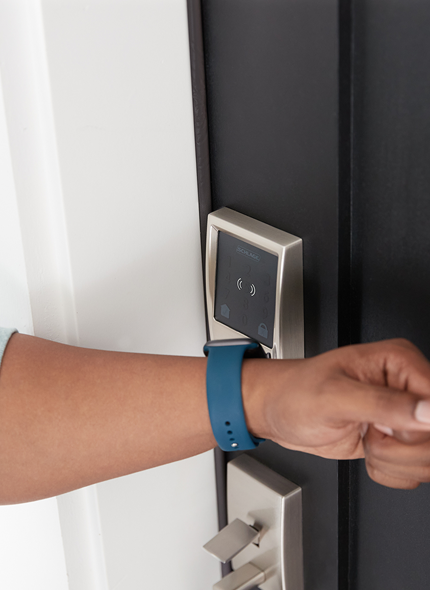
The Encode Plus adds Apple Home Key support over the standard Encode — meaning tenants with iPhones can tap to unlock without a code. For most long-term rental use cases, the standard Schlage Encode at $230–$250 delivers nearly identical functionality and saves $40–$70 per door, which adds up fast across a portfolio.
Schlage Encode vs. Encode Plus: Which Should Landlords Buy?
Feature Encode (Standard) Encode Plus Price ~$230–$250 ~$270–$300 Security Rating ANSI Grade 1 ANSI Grade 1 Built-in Wi-Fi ✓ ✓ Access Codes 100 100 Keypad ✓ ✓ Apple Home Key ✗ ✓ Alexa / Google ✓ ✓ HomeKit ✗ ✓ Airbnb Integration ✓ ✓ Warranty 3 years 3 years The honest answer for most landlords: buy the standard Encode. Apple Home Key lets tenants tap their iPhone or Apple Watch to unlock — it’s a nice-to-have, not a need-to-have. You get identical security, identical code capacity, identical remote access, and identical Airbnb integration. The Encode Plus is worth the premium only if you’re running a short-term rental and want the most seamless guest experience, or if your smart home is fully in the Apple ecosystem. On a 5-door portfolio, choosing the standard Encode over the Plus saves $200–$250 — enough to cover a year of batteries or one emergency maintenance call.
Bottom line: If you’re installing one lock on a single-family rental or a small portfolio and you want the most durable, no-nonsense option with the best warranty, this is the pick. Buy the standard Encode unless you have a specific reason for Apple Home Key.
[Check Current Price — Schlage Encode on Amazon →]
[Check Current Price — Schlage Encode Plus on Amazon →]
2. Yale Assure Lock 2 — Best for Multi-Property Portfolios
Price: ~$150–$290 depending on configuration
Security Rating: ANSI Grade 2
Connectivity: Modular (Bluetooth base; add Wi-Fi, Z-Wave, or Matter module)
Codes: Up to 250 unique access codes
Battery Life: 12–18 months
Warranty: Limited lifetime
Yale’s biggest advantage over the competition is the code capacity: 250 unique codes versus Schlage’s 100. For a landlord managing a multi-unit building or a portfolio with frequent contractor rotations, that headroom matters. You can assign permanent codes to long-term tenants, time-limited codes to cleaners, and one-use codes for delivery or repair visits — all without cannibalizing your capacity.
The 12–18 month battery life is the best on this list. On a 5-door portfolio, that’s roughly half as many battery changes per year compared to locks that last 6 months.
The modular connectivity is both a strength and a mild complication: the base model is Bluetooth-only, which means you need to be within range for remote access. Add the Wi-Fi module (~$50–$80 separately) for full remote capability. If you’re buying for a portfolio, factor that into the per-door cost. The Wi-Fi + Home Key version lands at $280–$290 all-in, comparable to the Schlage Encode Plus.
Yale integrates with HomeKit, Alexa, Google Assistant, and SmartThings — the broadest ecosystem compatibility on this list.
Bottom line: The code capacity and battery life make this the smarter buy for landlords managing 3+ units. The per-door cost is similar to Schlage once you add Wi-Fi, but 250 codes and 12–18 month batteries tip it in Yale’s favor at scale.
[Check Current Price on Amazon →]
3. August Wi-Fi Smart Lock (4th Gen) — Best for HOA Properties and Condos
Price: ~$180–$200 (add $60–$80 for the August Smart Keypad separately)
Security Rating: Depends on your existing deadbolt
Connectivity: Built-in Wi-Fi
Codes: Up to 100 unique access codes (with keypad)
Battery Life: ~3–6 months
Warranty: 1 year
August takes a completely different approach: it installs on the interior of your existing deadbolt, replacing only the thumb turn. The exterior hardware — lock cylinder, keyway, escutcheon — stays untouched. Your existing physical key still works.
For landlords, this has a specific use case: properties where you can’t modify the exterior hardware. HOA buildings, condos with board restrictions, or properties where you want the option to revert without any trace. Install takes under 10 minutes. Removal at unit sale or when switching tenants is equally simple.
The tradeoff is real. Because August doesn’t include a keypad in the base unit, you’re paying $240–$280 total for the lock + keypad combo — and the keypad is a separate Bluetooth device mounted next to the door, not integrated. The security rating depends entirely on the underlying deadbolt you’re retrofitting over, which is out of Schlage and Yale’s Grade 1 territory unless you’ve already installed a quality deadbolt separately.
August does have native Airbnb integration that auto-generates unique access codes per booking — genuinely useful for hosts running short-term rentals between long-term leases.
Bottom line: If you can change the exterior hardware, skip August and buy Schlage or Yale. If you can’t — HOA, condo, owner occupied with a co-op board — August is the only real option that doesn’t require you to touch the exterior.
[Check Current Price on Amazon →]
4. Ultraloq U-Bolt Pro Wi-Fi — Best Multi-Method Access
Price: ~$130–$150 (Wi-Fi bridge included)
Security Rating: ANSI Grade 2
Connectivity: Wi-Fi bridge included in box
Codes: Up to 100 codes
Battery Life: ~8 months
Access Methods: 6 (fingerprint, PIN, app, key fob, Bluetooth, physical key)
The Ultraloq U-Bolt Pro punches above its price point. Six entry methods on a sub-$150 lock is legitimately useful for rentals with diverse tenant populations — elderly tenants who want a physical key, younger tenants who prefer app control, and everyone in between.
The fingerprint scanner supports up to 100 prints. For a long-term rental, you can enroll every member of a household and skip the code management entirely. The Wi-Fi bridge ships in the box — unlike Yale’s base model, you don’t pay extra for remote access.
Build quality is the weak point relative to Schlage. ANSI Grade 2 is solid, but it’s not Grade 1, and some reviews note the fingerprint reader can struggle in very cold or very wet conditions. For SoCal rental properties, that’s not a meaningful concern.
Bottom line: Best value play if you want multi-method access without paying Schlage or Yale’s premium. Strong portfolio pick for properties where tenant diversity is a factor.
[Check Current Price on Amazon →]
5. Wyze Lock Pro — Best Budget Option
Price: ~$80–$100
Security Rating: ANSI Grade 2
Connectivity: Built-in Wi-Fi
Codes: Up to 50 codes
Battery Life: ~6 months
The Wyze Lock Pro is the entry-level answer for landlords who want keyless entry without a $250+ per-door investment. At under $100, it’s the cheapest lock on this list with built-in Wi-Fi (no hub required), remote access, and a keypad.
The limitations are real: 50 code capacity is thin for a multi-unit building, and Wyze’s ecosystem lives primarily inside Alexa — no HomeKit, no Google Home. The app has had historical reliability complaints, though Wyze has improved their firmware over the past two years.
For a landlord doing their first BRRRR or installing on a Class C rental where the unit economics don’t support a $280 Schlage, Wyze is a functional solution that still eliminates rekeying costs and gives you remote code management.
Bottom line: Use this if budget is a genuine constraint. Don’t use this if you’re building a portfolio where consistency and reliability across doors matters.
[Check Current Price on Amazon →]
Smart Lock Comparison Table
| Lock | Price | Security | Codes | Battery | Wi-Fi Included | Best For |
|---|---|---|---|---|---|---|
| Schlage Encode Plus | $270–$300 | Grade 1 | 100 | ~6 mo | ✓ | Single-family, best durability |
| Yale Assure Lock 2 | $150–$290 | Grade 2 | 250 | 12–18 mo | Add-on | Portfolios, multi-unit |
| August Wi-Fi 4th Gen | $180–$280* | Varies | 100 | ~3–6 mo | ✓ | HOAs, condos, retrofit |
| Ultraloq U-Bolt Pro | $130–$150 | Grade 2 | 100 | ~8 mo | ✓ | Multi-method, budget-mid |
| Wyze Lock Pro | $80–$100 | Grade 2 | 50 | ~6 mo | ✓ | Budget rentals |
*August base lock + keypad combo
The Real Math: What Smart Locks Save Landlords
Let’s run the actual numbers. These aren’t hypotheticals — they’re based on standard locksmith rates in Southern California as of 2026.
Standard rekey cost: $75–$125 per lock (business hours)
Emergency/after-hours rekey: $150–$250
Average turnovers per unit per year (SoCal): 1–2 for long-term rentals, 4–6 for furnished/short-term
Scenario: Long-term rental, 2 turnovers/year, 1 front door
- Annual rekey cost: $150–$250
- Schlage Encode Plus: $280 (one-time)
- Payback period: 1.1–1.9 years
- Year 3 savings (cumulative): $170–$470 net
Scenario: 5-unit portfolio, 1.5 turnovers/unit/year
- Annual rekey cost across portfolio: $560–$940
- Yale Assure Lock 2 (5 doors, Wi-Fi add-on): ~$1,750 one-time
- Payback period: 1.9–3.1 years
- Year 5 savings (cumulative): $1,050–$2,950 net
The savings compound once you add the labor cost of your own time — every locksmith call you avoid is a half-day you get back.
What to Look Out For
Battery management. Smart locks run on AA or AAA batteries, and a dead battery on a rental unit is a tenant emergency. Either enroll in auto-delivery for batteries (Amazon Subscribe & Save works well here), or set calendar reminders at 80% of the rated battery life. Most apps send low-battery alerts — make sure notifications are on.
Wi-Fi dead zones. Older SoCal homes with thick plaster walls or detached ADUs can have inconsistent Wi-Fi coverage at the front door. Test signal strength at the lock location before installation. A $30 Wi-Fi extender solves most dead zone problems.
Tenant education. A smart lock is only useful if your tenant knows how to use it. Include a one-page instruction sheet in your move-in packet. Two minutes of education prevents a 10 p.m. lockout call.
HOA and lease compliance. If you’re installing on a unit inside an HOA or condo association, verify that your CC&Rs allow exterior hardware modifications. August’s retrofit design sidesteps this issue entirely for properties where it applies.
Our Pick by Landlord Type
First fix-and-flip converting to a BRRRR rental: Schlage Encode (standard, not Plus) at $230–$250. Grade 1 security, no subscription, proven reliability. Save the $40–$70 per door.
Building a 3–5 unit portfolio: Yale Assure Lock 2 with Wi-Fi module. The 250-code capacity and 12–18 month battery life have compounding operational advantages at scale.
Condo or HOA-restricted unit: August Wi-Fi 4th Gen. Not negotiable — it’s the only full-featured option that doesn’t touch the exterior.
Class C rental on tight margins: Ultraloq U-Bolt Pro. Grade 2 security, Wi-Fi included, sub-$150 per door.
Disclosure: FlipperGrade.com uses affiliate links. If you purchase through links on this page, we may earn a commission at no additional cost to you. We only recommend products we’d install on our own rental units.